
All writing · 14 Apr 2026 · 6 min read
Claude Managed Agents: Anthropic Just Shipped the Runtime
Anthropic quietly shipped the missing layer for agentic AI — a fully hosted runtime where Claude runs its own loop, tools, and session in their cloud. Here is what the four building blocks actually do, with code.
When you build an AI agent from scratch, you spend more time on plumbing than on product. The agent loop, tool execution, context window management, sandboxing, session persistence — all of it has to be wired up before a single line of real logic runs. When something breaks mid-task, you're debugging infrastructure instead of shipping.
This week Anthropic shipped Claude Managed Agents, and the pitch is exactly that: stop giving you an API to wrap your own loop around, start handing you the runtime.
What they actually shipped
Two things, in the same release:
Claude Managed Agents — a fully hosted agent harness on Anthropic's infrastructure. You describe the agent, fire a task, Anthropic handles the container, the tools, the execution, the session. The agent runs in their cloud.
Claude Agent SDK (formerly the Claude Code SDK) — a Python and TypeScript library that embeds the same agent loop powering Claude Code into your own app. Same guts, but you host it.
Both solve the same problem. The difference is where the agent runs. For most teams, Managed Agents is the bigger release — it removes the one piece of the stack that everyone rebuilds badly.
The four building blocks
The whole system clicks once you understand four concepts:
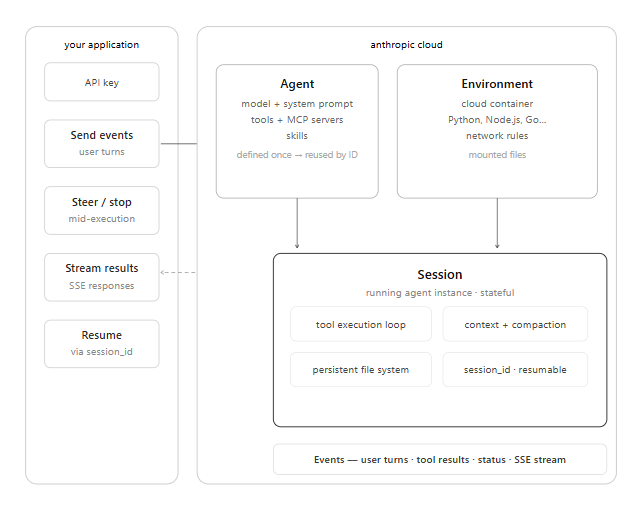
Agent — your configuration: model, system prompt, tools, MCP servers, skills. Define once, reference by ID across every session. This is the shape of your agent.
Environment — a cloud container with pre-installed packages (Python, Node.js, Go, and more), network rules, and mounted files. This is the workspace.
Session — a running instance of an agent inside an environment, executing a specific task. Files, conversation, and context persist across its lifetime. Resumable by ID.
Events — the messages flowing between your app and the agent: user turns, tool results, status updates, streamed responses.
Here's the full setup in code. Create the agent once:
import anthropic
client = anthropic.Anthropic()

agent = client.beta.agents.create(
    model="claude-sonnet-4-6",
    system="You are a software engineer. Fix bugs, run tests, report results.",
    tools=[{"type": "bash"}, {"type": "file_operations"}, {"type": "web_search"}],
    name="bug-fixer"
)
print(agent.id)  # save — reuse across sessions
Start a session and send a task:
environment = client.beta.environments.create(packages=["pytest", "requests"])

session = client.beta.sessions.create(
    agent_id=agent.id,
    environment_id=environment.id
)

response = client.beta.sessions.events.create(
    session_id=session.id,
    content="Find and fix the failing tests in auth.py"
)
That's it. One agent definition, one environment, one session. Claude takes it from there.
The agent loop
When a session starts, Claude doesn't reply once and wait. It runs a continuous loop — receive prompt, evaluate, call tools, process results, repeat — until the task is done. Each full round trip is one turn.
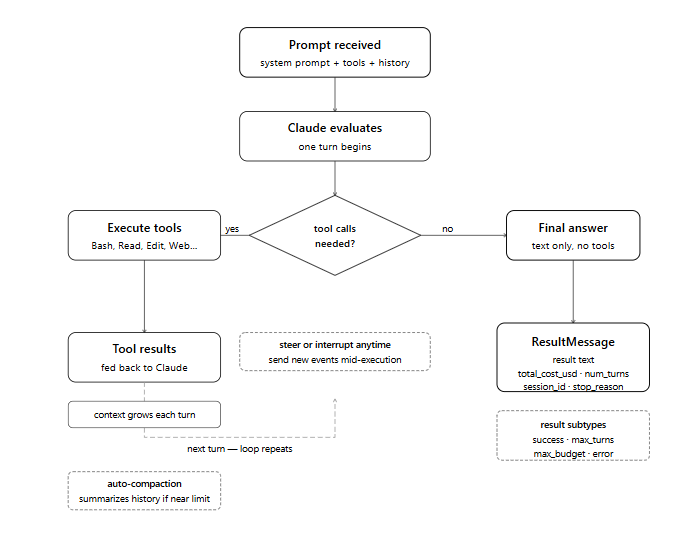
For the bug-fix task above, a session looks like:
- Turn 1 — Claude runs the test suite via Bash. Three failures return.
- Turn 2 — Claude reads
auth.pyand the test file to understand the problem. - Turn 3 — Claude edits the file, re-runs tests. All three pass.
- Final turn — Claude returns text with no tool calls. Task complete.
Streaming gives you full visibility into every turn as it happens:
async for event in client.beta.sessions.stream(
    session_id=session.id,
    event={"type": "user", "content": "Find and fix the failing tests in auth.py"}
):
    if event.type == "assistant_message":
        print(event.content)
    if event.type == "result":
        print(f"Done: {event.result}")
        print(f"Turns: {event.num_turns}  Cost: ${event.total_cost_usd:.4f}")
        session_id = event.session_id  # save to resume later
Context compaction is built in
The single most common reason DIY agent setups die is context. Every turn adds: prompt, tool definitions, file reads, command outputs, conversation history. Hit the window limit, the session dies.
Managed Agents handles this automatically. As the context window fills, the system summarises older history to free space while preserving recent exchanges and key decisions. The session just keeps going.
This is the thing I'd have paid for on its own. It's also the thing I'd least want to build myself.
Three controls that actually matter
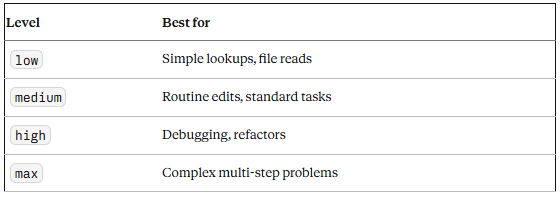
Effort level — how deeply Claude reasons per turn. Directly affects token cost:
Max turns and budget — cap the loop before it runs away:
session = client.beta.sessions.create(
    agent_id=agent.id,
    environment_id=environment.id,
    max_turns=20,           # stop after 20 tool-use turns
    max_budget_usd=0.50     # or when spend hits $0.50
)
When either limit is hit, the session returns a result subtype telling you why, and you can resume with the session ID if needed.
Permission mode — what Claude can do without asking:
| Mode | Behavior | When to use |
|---|---|---|
default | Gates anything not pre-approved through your callback | Production, user-facing |
acceptEdits | Auto-approves file edits, still gates shell commands | Trusted internal workflows |
bypassPermissions | Runs everything without prompting | Isolated containers, CI only |
Steering mid-task
This is my favorite part. While a session is running, you can send events to redirect it, add context, or stop it:
client.beta.sessions.events.create(
    session_id=session.id,
    content="Actually, only fix the auth_token tests — leave the login tests alone"
)
Sessions are persistent. Capture the session ID, come back an hour later, resume where you left off:
async for event in client.beta.sessions.stream(
    session_id="sess_abc123",
    event={"type": "user", "content": "Continue — now fix the payment module too"}
):
    if event.type == "result":
        print(event.result)
The toolset
The biggest time-waster in DIY agents is tool execution — writing wrappers, handling errors, feeding results back into context. Managed Agents has all of this done:
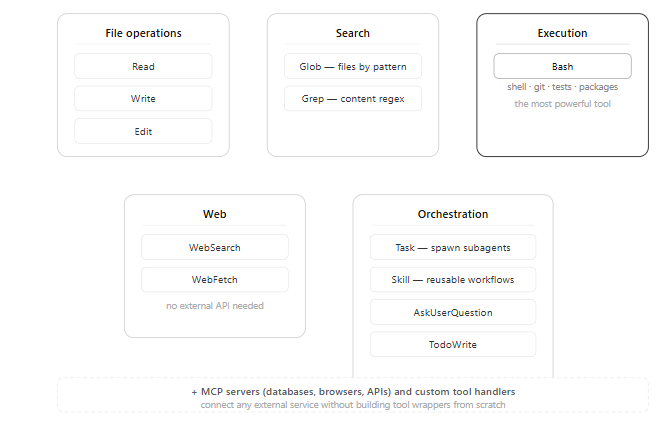
- File operations —
Read,Write,Edit - Search —
Glob(files by pattern),Grep(content regex) - Execution —
Bash(the most powerful — shell, git, tests, packages) - Web —
WebSearch,WebFetch - Orchestration —
Task(spawn subagents),Skill(reusable workflows),AskUserQuestion,TodoWrite
Beyond built-ins, you connect external services via MCP servers and define custom tools with your own handlers. The skill invocation surface is the same one Claude Code uses — anything you've built as a skill already plugs in.
Animated architecture view
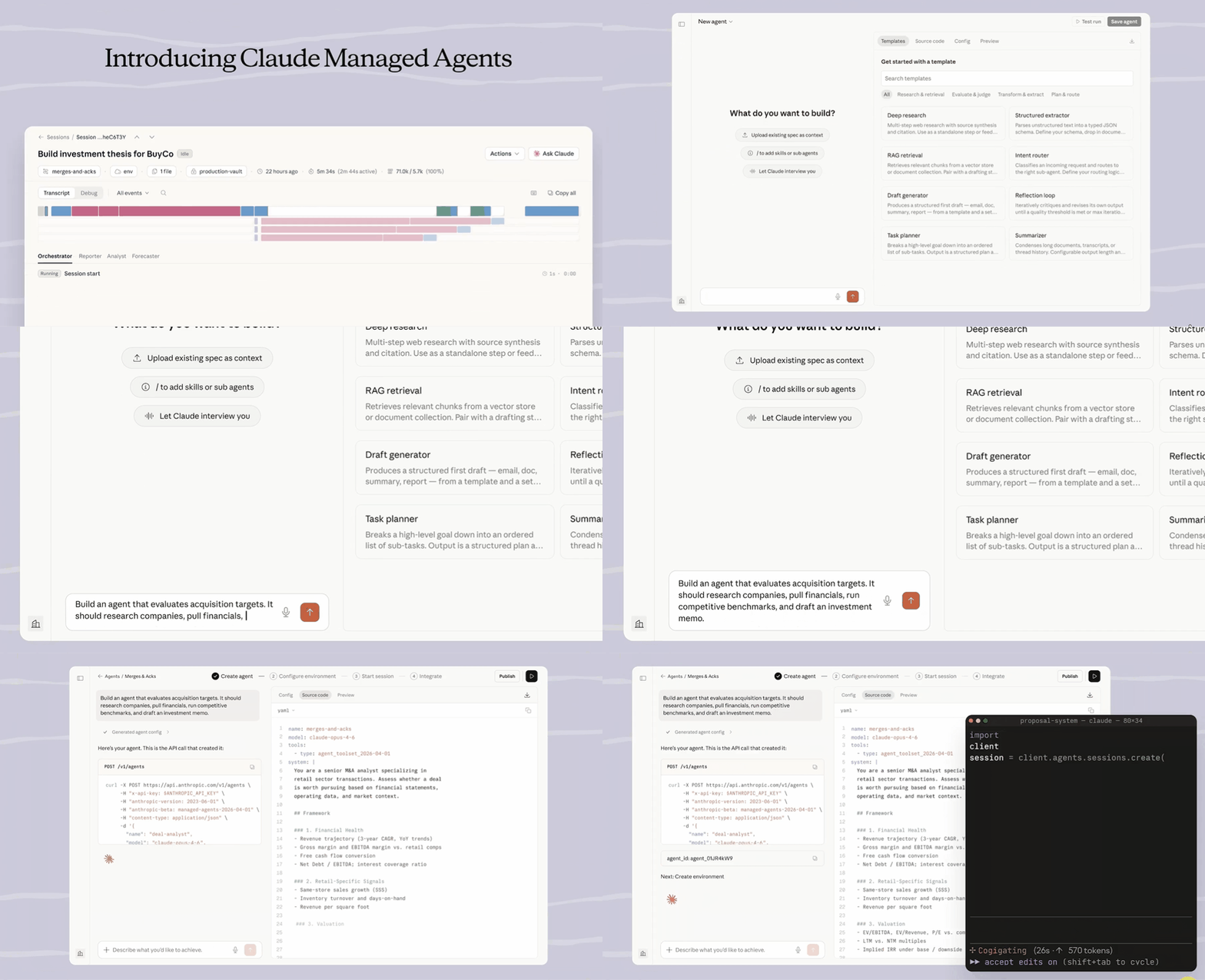
Anthropic's architecture diagram shows the whole flow from application through Anthropic cloud to the session container:
Getting started
Managed Agents is in beta. Access is enabled by default for all API accounts — if you have a Claude API key, you can start now.
What you need:
- A Claude API key from platform.claude.com
- The
managed-agents-2026-04-01beta header (the SDK sets this automatically) - The Python or TypeScript SDK
pip install anthropic
export ANTHROPIC_API_KEY=your-api-key
A working agent in under 20 lines:
import anthropic, asyncio

client = anthropic.Anthropic()

async def main():
    agent = client.beta.agents.create(
        model="claude-sonnet-4-6",
        system="You are a helpful engineering assistant.",
        tools=[{"type": "bash"}, {"type": "file_operations"}],
        name="my-first-agent"
    )
    environment = client.beta.environments.create(packages=["pytest"])
    session = client.beta.sessions.create(
        agent_id=agent.id,
        environment_id=environment.id,
        max_turns=10,
        max_budget_usd=0.25
    )
    async for event in client.beta.sessions.stream(
        session_id=session.id,
        event={"type": "user", "content": "List all Python files in this directory"}
    ):
        if event.type == "result":
            print(event.result)
            print(f"Cost: ${event.total_cost_usd:.4f}")

asyncio.run(main())
Three features are still in research preview and require a separate access request at claude.com/form/claude-managed-agents:
- Outcomes — structured task completion signals
- Multi-agent coordination — agents talking to other agents
- Persistent memory — long-term state across sessions
What this actually changes
The agent loop, context compaction, tool execution, session continuity — what used to be weeks of infrastructure is now a config block and an API call. That matters. For anyone shipping production agents, this is the difference between "we'll get to it in Q3" and "let's prototype on Friday."
The trade-off is the usual one: the quality of the output still depends on the quality of the input. The runtime is free; knowing what to ask is not. If you're still debugging infrastructure when you should be refining prompts and tool design, this release is for you.
If you want to learn working with Claude Code better, visit the course page.
Claude Code · AI · Tools · Product