All writing · 28 May 2026 · 15 min read
Claude Design: A Field Guide for Designers, Founders, and Engineers
Anthropic's new design tool is a visual layer on top of Claude Code, built around a design-system foundation, smart enough to ask UX questions before generating. Here's what it does, where it breaks, and how to actually use it.
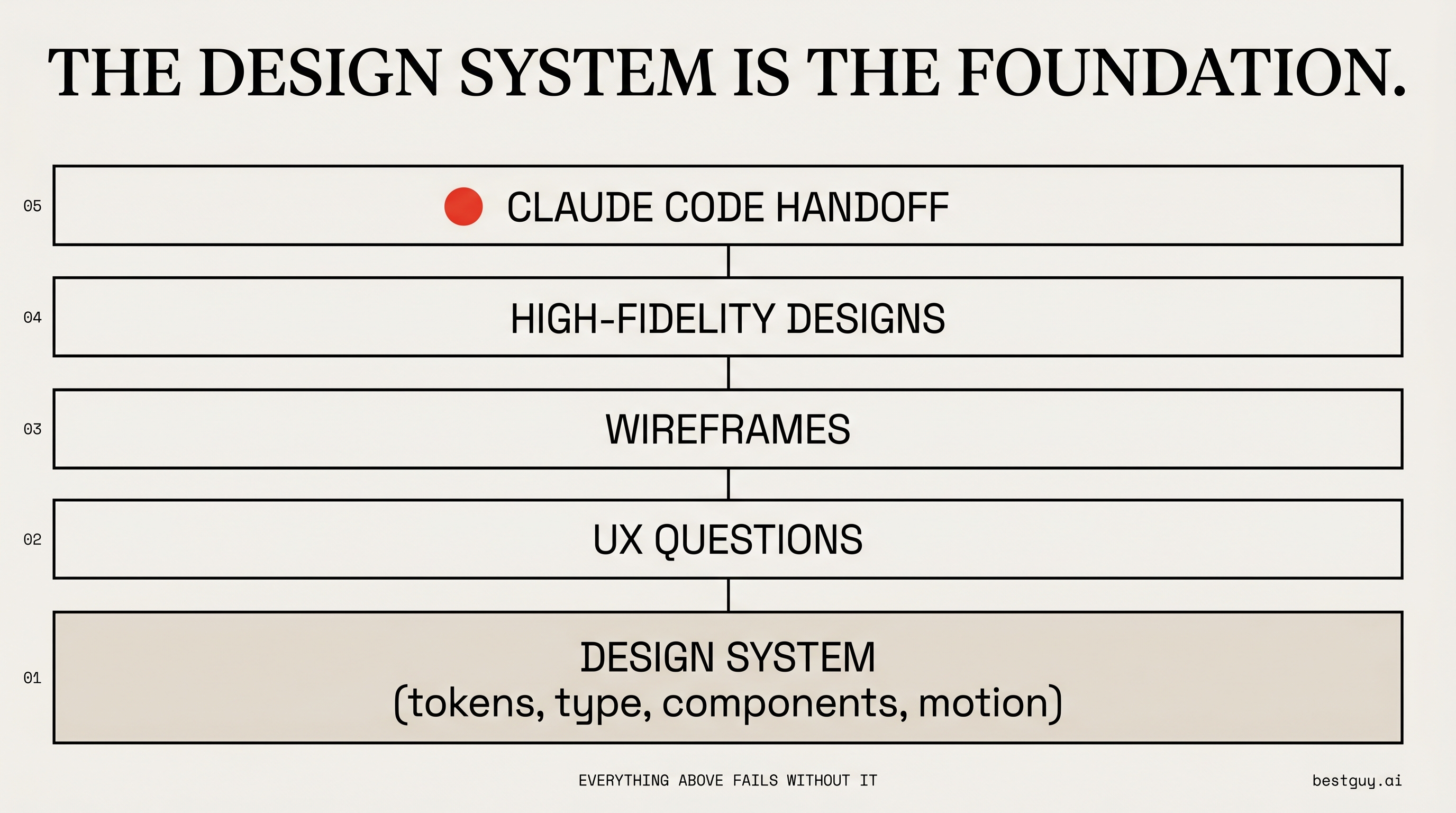
Anthropic shipped Claude Design on April 17, 2026 as a Research Preview from Anthropic Labs — a separate product that sits on top of Claude Opus 4.7's vision model. It's been positioned variously as a "Figma killer," a "tool for non-designers," and a "prototype-to-code pipeline." It's not really any of those. After working with it, here's the way I'd describe it: Claude Design is a visual layer on top of Claude Code, organized around a design system as the source of truth. Everything else — wireframes, hi-fi mockups, slide decks, web captures — flows from that one foundational decision.
This guide is what I wish I'd had on day one: what it does, where it breaks, what it costs you, and the workflow I'd actually run with it.
TL;DR
Claude Design is the cleanest path I've found from "I have a brand and an idea" to "I have a working code handoff" — provided your brand exists as a real design system (tokens, components, type scale) and you're prepared to drive the UX decisions yourself. It will not invent a coherent product for you. It will not save you from poor information architecture. What it will do is collapse the time between a wireframe sketch and a buildable, brand-consistent prototype from a week to a couple of hours. If your existing design tool is a Figma file and three Slack threads, this changes your workflow. If your design tool is a fully-resourced design team using Figma libraries with mature components, it changes nothing yet.
What Is Claude Design?
A standalone product at claude.ai/design. Available to anyone on a Claude Pro, Max, Team, or Enterprise plan. Worth noting on usage limits: This changed recently. At launch in April, Claude Design had its own separate usage bucket. As of late May 2026, Anthropic has unified them — a banner inside the product now reads "Claude Design now shares usage limits with Claude.ai and Claude Code." So your Claude Design work and your Claude Code work draw from the same pool now. The tool is still token-hungry, especially during design system generation — but at least you're not juggling two separate quotas.
Under the hood it's a vision-model-driven design environment built on Opus 4.7. The UI is a three-pane layout you'll recognize if you've used any modern AI tool: chat on the left, live canvas in the middle, a "Tweaks" panel on the right that exposes design-system-aware controls (think Figma variant toggles, but generated on the fly per project).
It does not run as a desktop app. Browser only, as of writing. If you're doing the full pipeline through to implementation, you'll hop to the Claude Code desktop app at handoff.
The Design System Is the Foundation — Not a Bonus
This is the part everyone glosses over. Claude Design is built on the assumption that you have, or are willing to create, a real design system. Not "I picked some colors I like." A system with:
- Color tokens that pass accessibility checks
- A typography scale
- Spacing scale
- Component primitives (buttons, cards, inputs, etc.)
- Motion / animation rules
- Logo / wordmark assets
If you have one, you can bring it in three ways:
- Link a GitHub repository of your components
- Upload a folder from your computer (CSS files, asset folders, README, design notes)
- Upload a Figma FIG file — Claude reads the Figma export directly
If you don't have one, Claude Design will generate a draft system from a brand snapshot, a style guide, or even visual inspiration. The output is a real, reviewable artifact — color palette with foreground/surface relationships, a type scale, spacing tokens, a button suite, a wordmark, and motion specifications. You approve each section before it gets canonized.
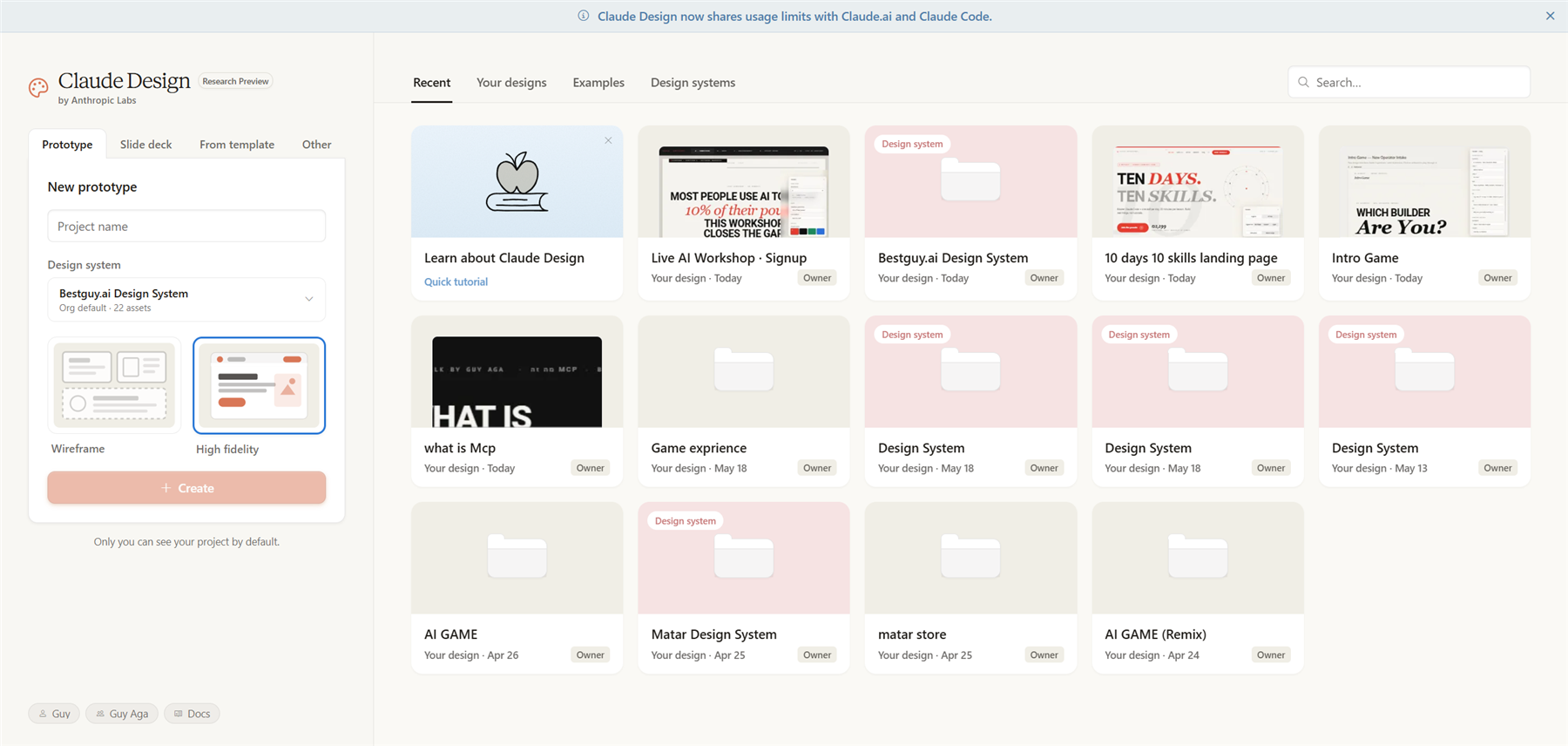
The screenshot above is my live dashboard — the bestguy.ai design system is set as my default, so every new prototype I start inherits those tokens automatically. The mix of tiles you see on the right are projects I built earlier with different systems (Matar, AI GAME, others) — Claude Design lets you keep multiple systems side-by-side and switch the default per project. When you open the design-system picker on a new prototype, Claude shows you exactly which slices of the system it has parsed and indexed:
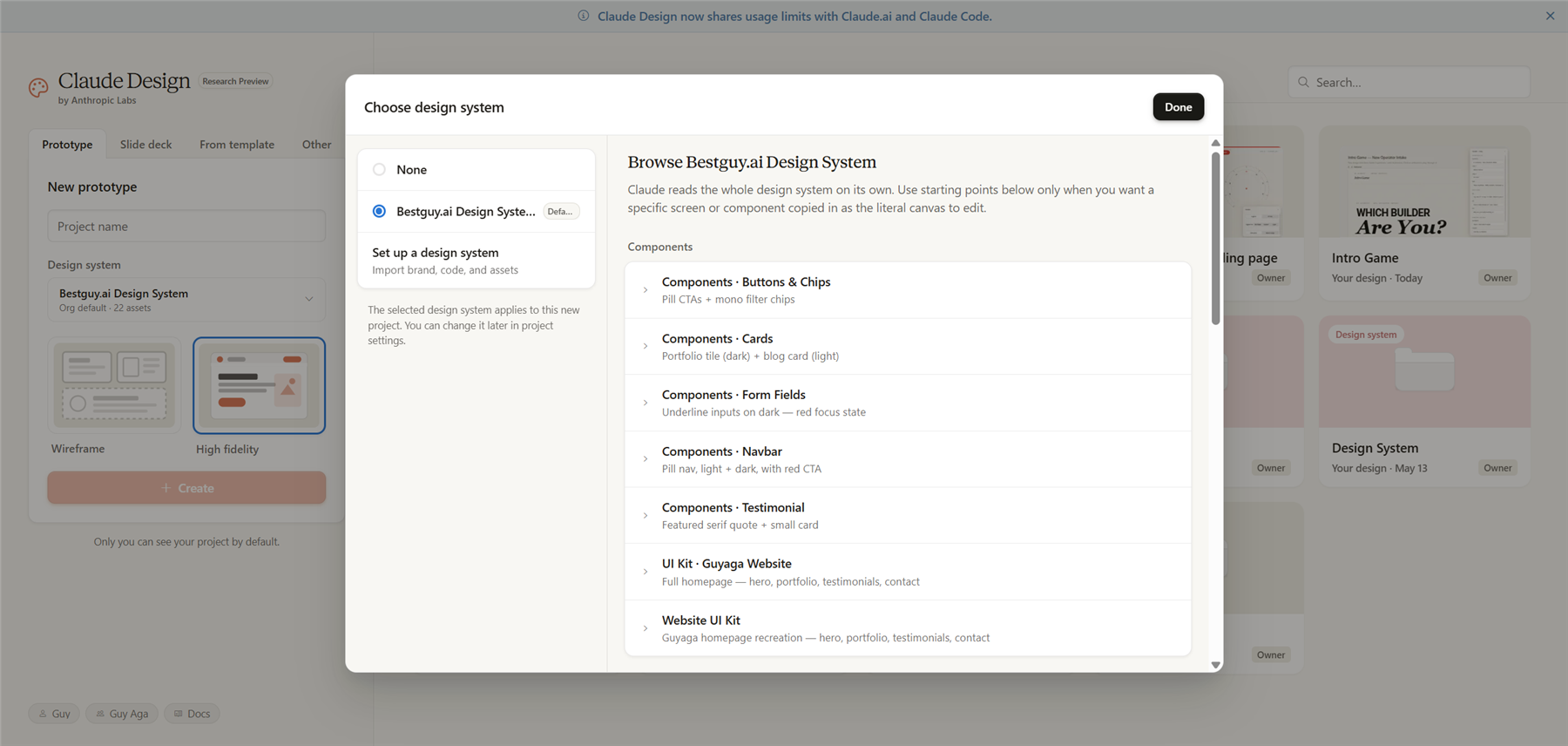
Notice the components list: Buttons & Chips, Cards, Form Fields, Navbar, Testimonial, plus two full UI Kits. Some of those names track the files I uploaded; others (the short captions under each — "Pill CTAs + mono filter chips," "Underline inputs on dark — red focus state") Claude wrote by reading the actual CSS and component examples. The picker is what a parsed design system looks like — entry points you can edit individually, not a pile of raw tokens.
Pro tip: Generation is the most token-expensive step in the entire pipeline. If you can pre-bake your system in something cheap (Google Stitch is a popular pick) and import it as a folder, you preserve credits for the parts of the workflow where Claude Design's UX intelligence actually earns its keep.
The Workflow, End to End
Here's the sequence I'd run for a real project:
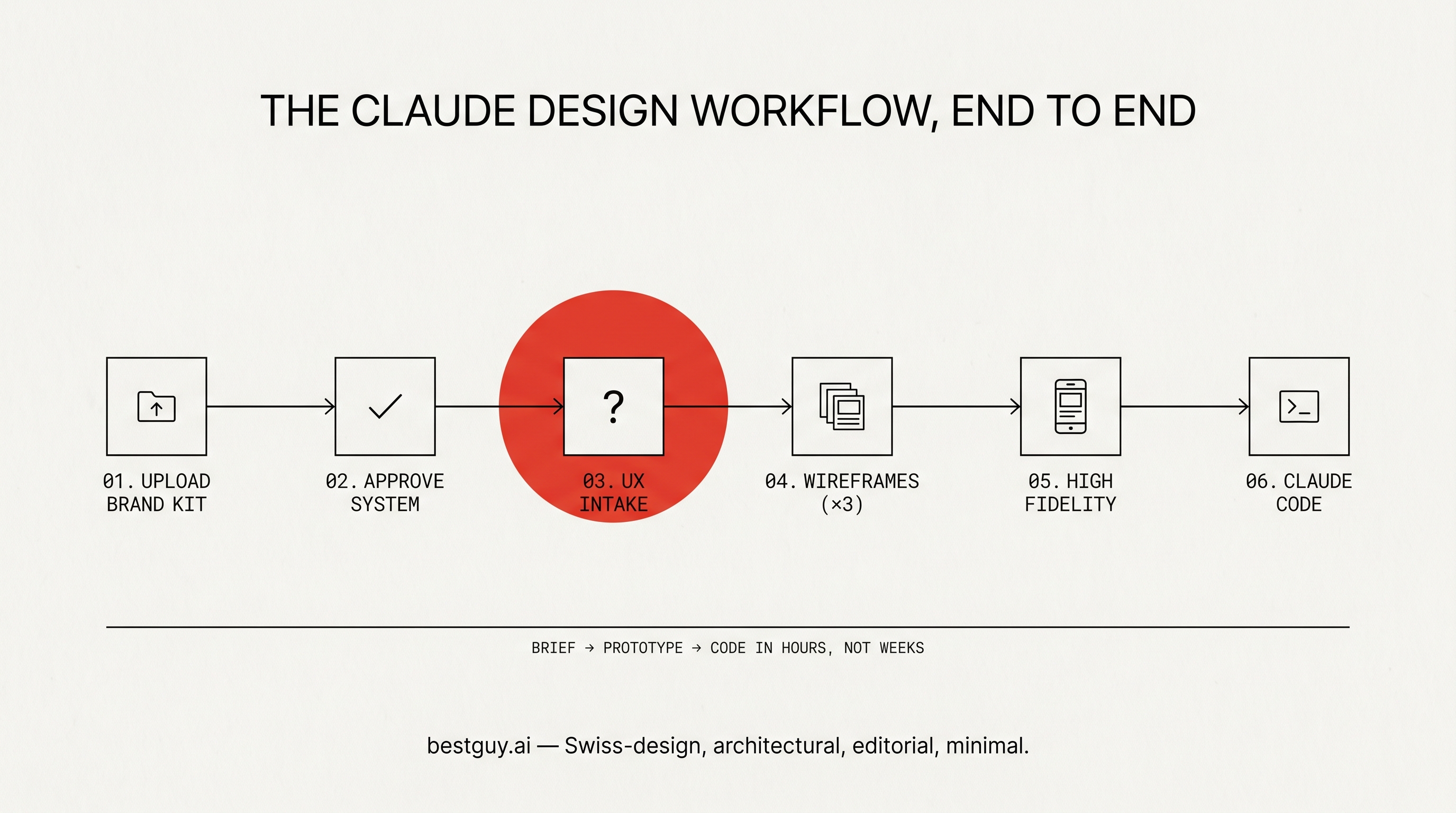
1. Set up the design system. Upload your assets, GitHub repo, or FIG file. Add reference files (existing screens, brand notes, anything that constrains the system). Watch Claude grind through a checklist of files: reading assets, generating colors_and_type.css, writing CONTENT and VISUAL FOUNDATIONS sections, building a UI kit, finalizing the README. Takes about five minutes for a moderate system.
2. Review and approve the draft. Walk through the color palette, fix any accessibility violations Claude flags (it does run contrast checks and will rewrite tokens on request), confirm the type scale, the spacing scale, the button states, the motion language. Accept or send back. Critical: the more rigor you put into this step, the less drift you fight in every subsequent step.
3. Start a project. Wireframes or hi-fi. For a new product, always wireframes first.
4. Answer the UX intake questions. This is the moment Claude Design stops looking like a generator and starts looking like a junior product designer. Before producing anything, it asks:
- What is this product actually for?
- What's the onboarding length you want?
- Do you want multiple stylistic directions to compare?
- How should users interact with the core action?
- What's the paywall / business model UX?
That last one is the differentiator. No other AI design tool I've used asks you about monetization surfaces before drawing pixels. It is the single most product-mature touch in the tool.
5. Define the tweaks. This is the variant-controls panel. You pre-declare what you want to be able to toggle live in the final design — typography weight, density, color mode, motion intensity, whatever's relevant. Like Figma variants, but generated.
6. Generate wireframes — Claude offers three to five direction variants, your call. Pick the direction. Open the Tweaks panel. Zoom in. Comment on anything that bothers you ("Is this progress indicator clear enough?"). Edit spacing or opacity directly. Draw on the canvas and tell Claude what you want changed.
7. Move to high-fidelity. Open your design system, confirm it's set as default, click "create new design using this design system." Attach the wireframe variant you chose as reference. Click "high fidelity." Answer another round of UX questions (yes, again — this is how it stays on-rails). Generate.
8. Hand off to Claude Code. Open the Share menu and pick Handoff to Claude Code. Claude Design opens a modal with two tabs — Send to local coding agent or Send to Claude Code Web — and generates a copy-paste command that looks like this:
Fetch this design file, read its readme, and implement the relevant aspects of the design.
https://api.anthropic.com/v1/design/h/{your-handoff-token}
Implement: [project-name].html
Paste it into a Claude Code session. The agent fetches the design bundle directly from Anthropic's API — no zip upload required by default (you can toggle "Download zip instead" if you prefer to drop the bundle in manually). Claude Code reads the design system, the wireframe spec, and the README, then implements the screens in your target stack.
What It Does Well
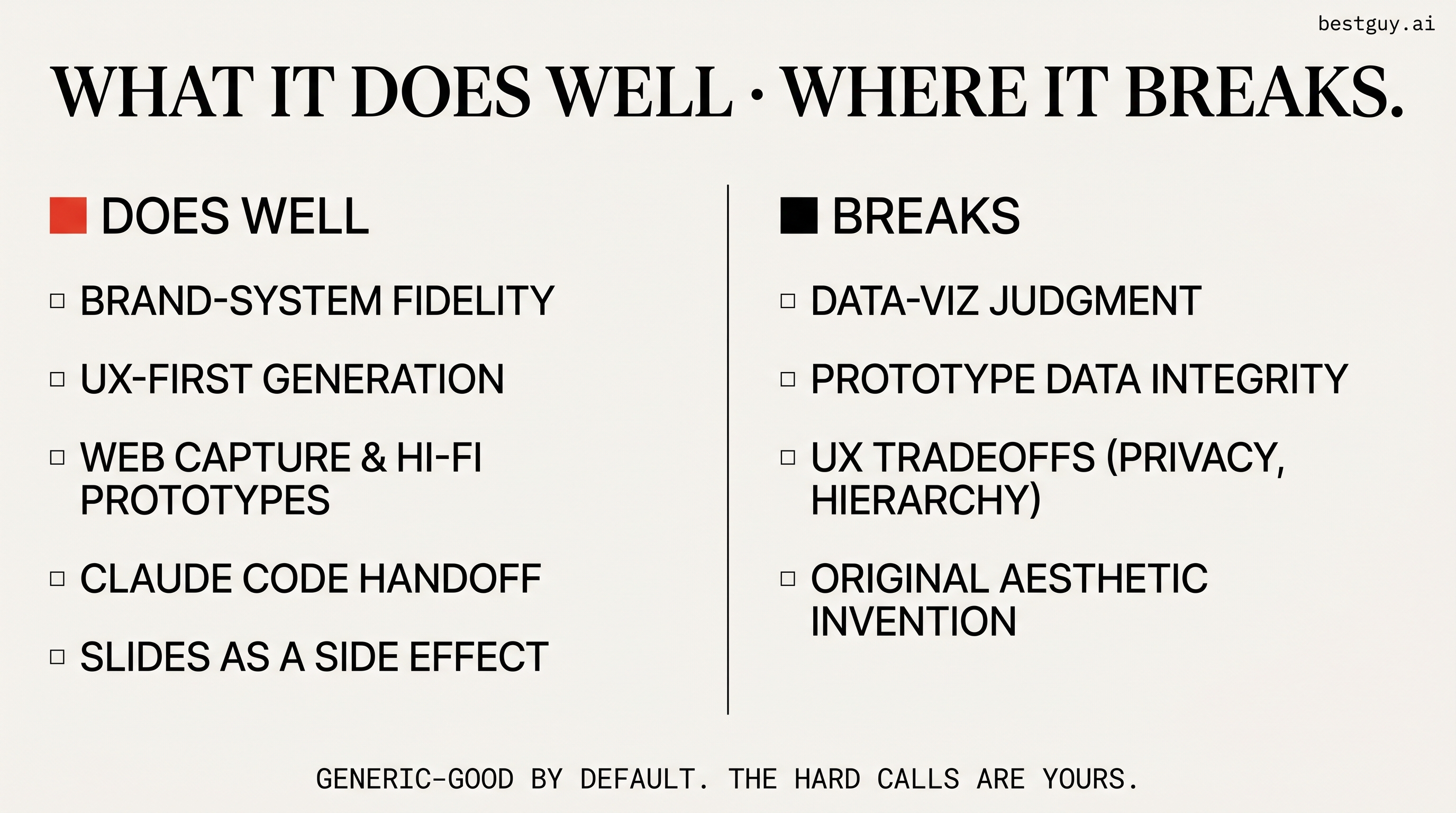
Brand-system fidelity. Once the system is approved, Claude Design respects your tokens. Generated screens use your colors, type, and components without drifting. This is the single biggest reason it beats every other "AI design tool" I've tried — none of them treat a real design system as a first-class citizen.
UX-aware generation. The intake questions force you to articulate decisions before pixels exist. Stitch, Lovable, v0, Replit — they all generate first and let you fix later. Claude Design generates from a brief, the way a human designer would.
Web capture. A built-in tool to grab an element from any live URL and pull it into your canvas. Useful for benchmarking, lifting layout patterns, or building prototypes that look like the real product they're replacing.
Code-powered prototypes. It supports more than static mockups — voice, video, shaders, 3D, ambient motion. The motion language you defined in the system gets respected here. It's not a flashy demo; it's a real prototype.
Code handoff. The zip-plus-command pattern is the tightest design-to-code handoff I've used. Whatever Claude Code generates from it respects the design tokens because the same system is the source of truth on both ends.
Slides and one-pagers as a side-effect. Once your design system is in place, generating an on-brand pitch deck or one-pager takes a paragraph of prompt. Export to PPTX, PDF, or send to Canva for further editing. Not the primary use case, but a useful adjacency.
What It Costs You
Aside from the obvious subscription cost (Pro at minimum), the real costs are:
| Cost | Reality |
|---|---|
| Tokens | Design system generation is the heaviest step. Hi-fi generation with attached wireframes is the second. Plan to burn meaningful credits per substantial project. |
| Shared usage bucket (as of May 2026) | Claude Design now pulls from the same quota as Claude.ai and Claude Code. Heavy generation eats your Claude budget directly. |
| Browser-only | No desktop app. Switch contexts at handoff time. Minor friction. |
| No team review yet | You can share an internal URL, but lightweight inline comment workflows on the design itself are still rough. |
I Ran bestguy.ai Through Claude Design — Here's What Actually Happened
To stress-test everything I'd researched, I uploaded the bestguy.ai design system to Claude Design and asked it to wireframe a landing page for a hypothetical 90-minute live AI workshop. Three observations from running the real workflow:
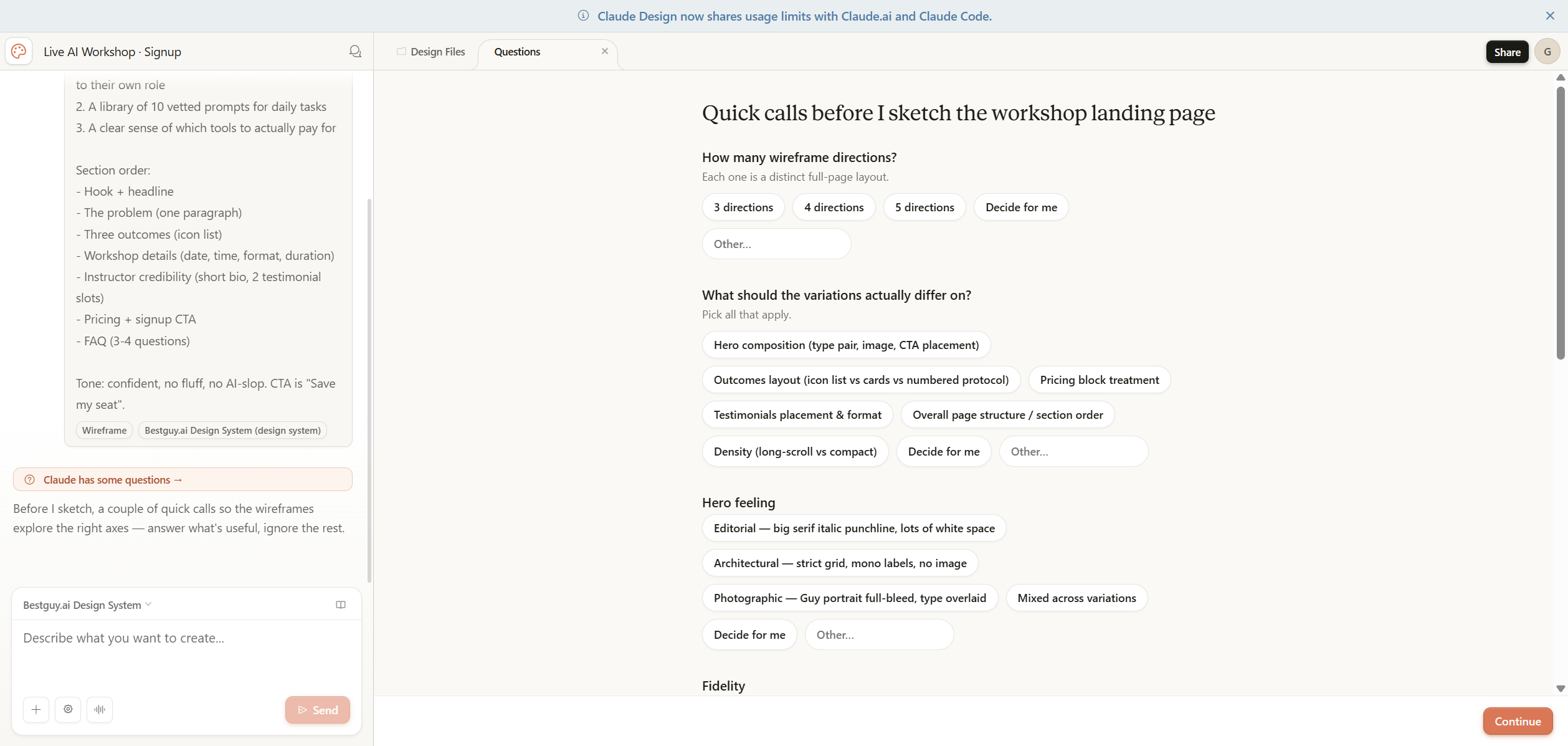
1. The UX intake is more brand-aware than I expected. Before drawing a single pixel, Claude Design asked eight questions: how many wireframe directions, what should variations differ on, hero feeling (with options "Editorial — big serif italic punchline", "Architectural — strict grid, mono labels", "Photographic — Guy portrait full-bleed"), fidelity, placeholder content style, language (English / Hebrew RTL / both — it knew my brand serves both), which tweaks to expose in the side panel, and a free-text "anything else worth knowing." Every option was framed in terms of my actual design system. This isn't generic generation. The intake form is the product.
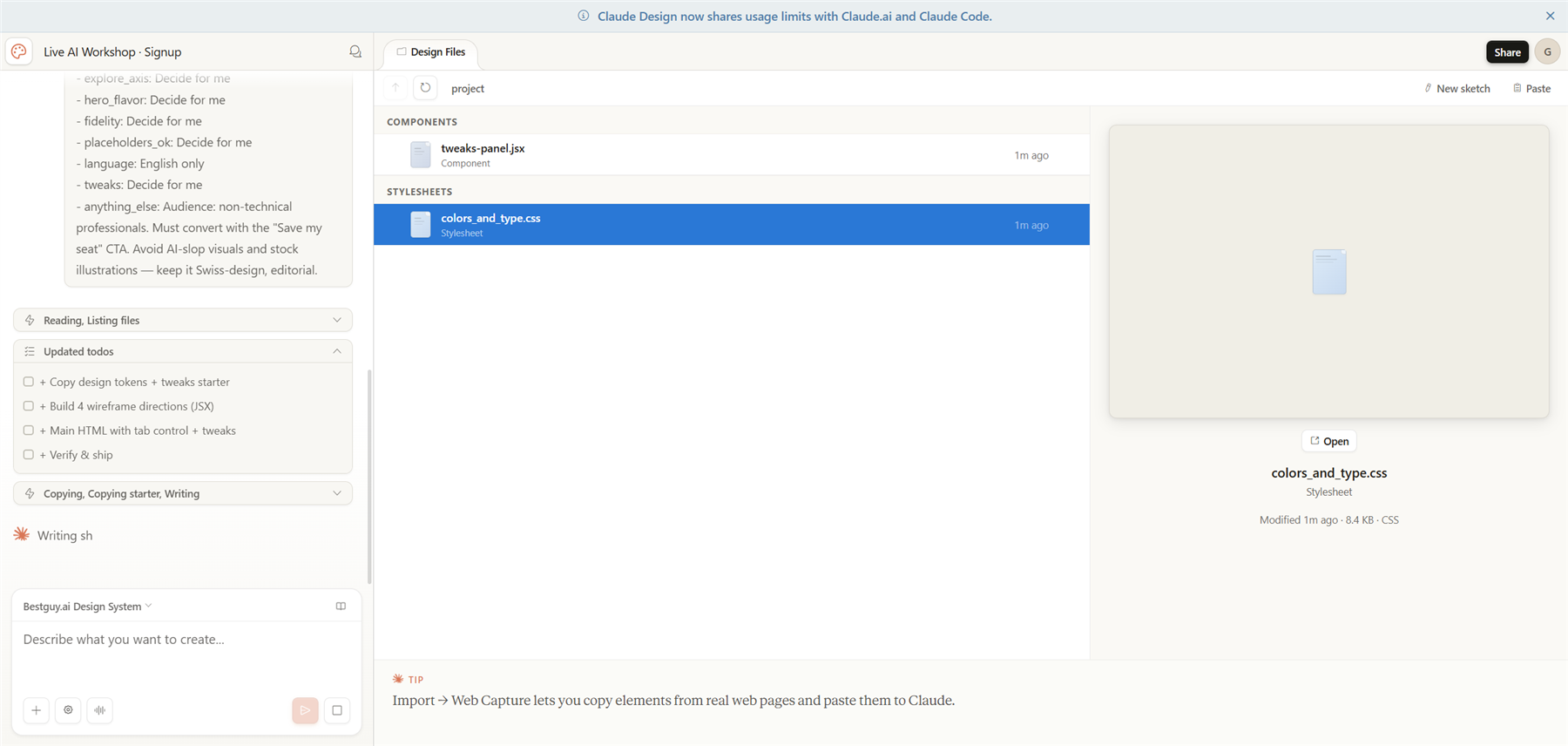
2. The build plan is transparent. Once I answered, Claude Design laid out a literal checklist in the chat: "Copy design tokens + tweaks starter → Build 4 wireframe directions (JSX) → Main HTML with tab control + tweaks → Verify & ship," then started copying my design system files (colors_and_type.css, tweaks-panel.jsx, etc.) into the project. You can watch it work — no black-box generation.
3. The output is genuinely on-brand. What came back was Direction A — "Editorial Manifesto" — with a big serif italic headline ("Most people use AI tools at 10% of their power. This workshop closes the gap."), signal-red accent on the punchline, the full nav in mono caps, the section structure I'd asked for. No invented colors, no AI-default purple-blue gradients, no rounded-card slop. It looks like something I could ship.
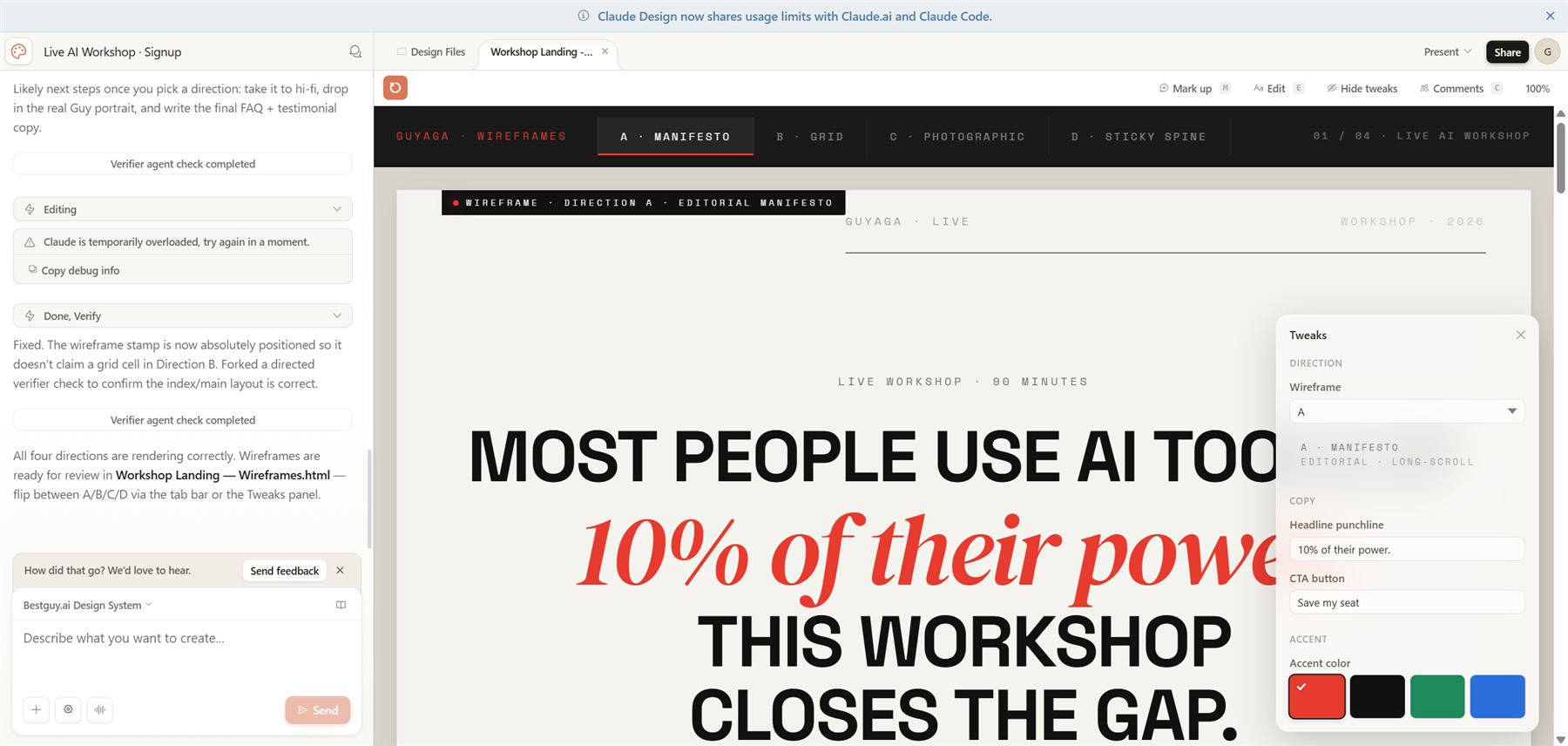
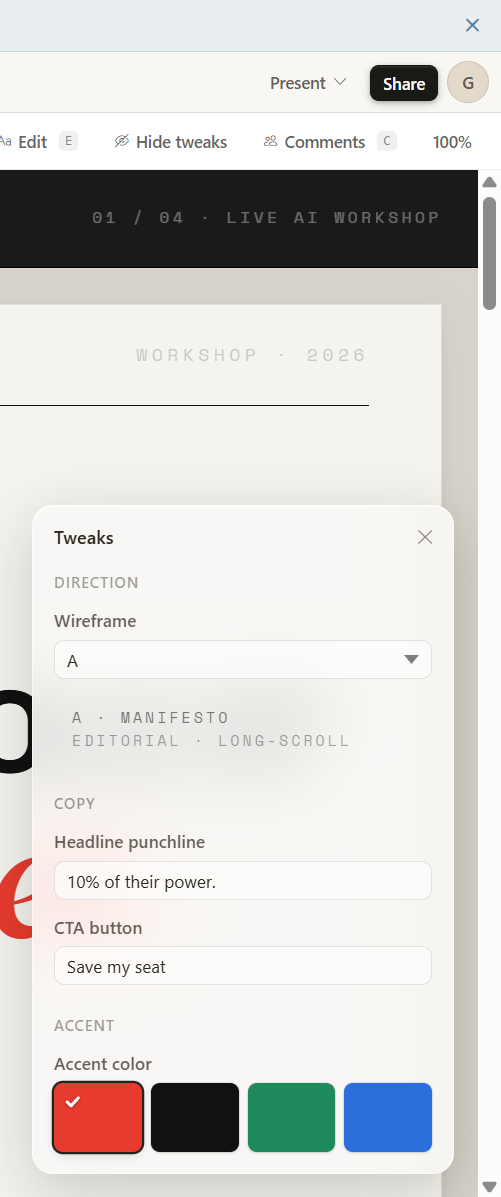
The Tweaks panel on the right of the canvas is where Claude Design quietly diverges from "AI image-of-a-UI" generators. Every control there — the Direction dropdown, the Headline punchline text field, the CTA button text, the accent color swatches — is wired to a real prop in the generated wireframe. Change the punchline and the rendered hero updates in place. Change the accent and the signal-red swatches across the page recolor. It's not a re-render; it's a live design API the model exposes for you.
Those controls are how I toggled between the four generated directions, edited the headline copy live, and switched density modes — exactly the variant-controls model the Medium author described, but actually wired up against my real design tokens.
For the post, this confirms the thesis: the design system is the foundation, the intake is the differentiator, and the brand-fidelity claim is real. Where it gets interesting is the failure modes — let's get to those.
The Claude Code Handoff Is the Quiet Killer Feature
Once you have a wireframe direction you like, the Share menu surfaces a list of export options most design tools envy — PDF, PPTX, standalone HTML, ZIP, Send to Canva — and one option that nobody else has: Handoff to Claude Code.
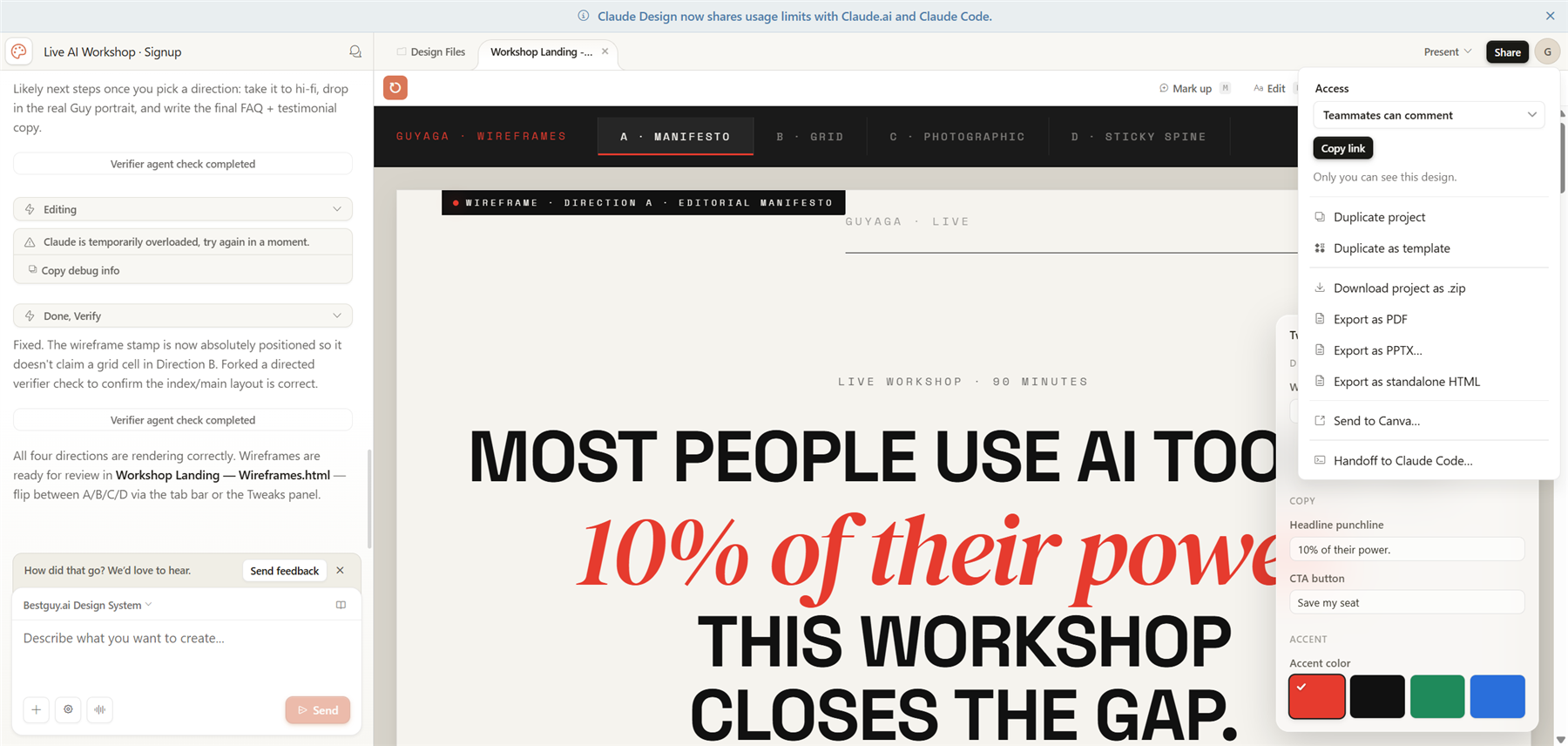
Click it and Claude Design generates a one-line command you paste into a Claude Code session (local or web). The command tells the agent exactly where to fetch the design file from, what to read first (the design's own readme), and what to implement.
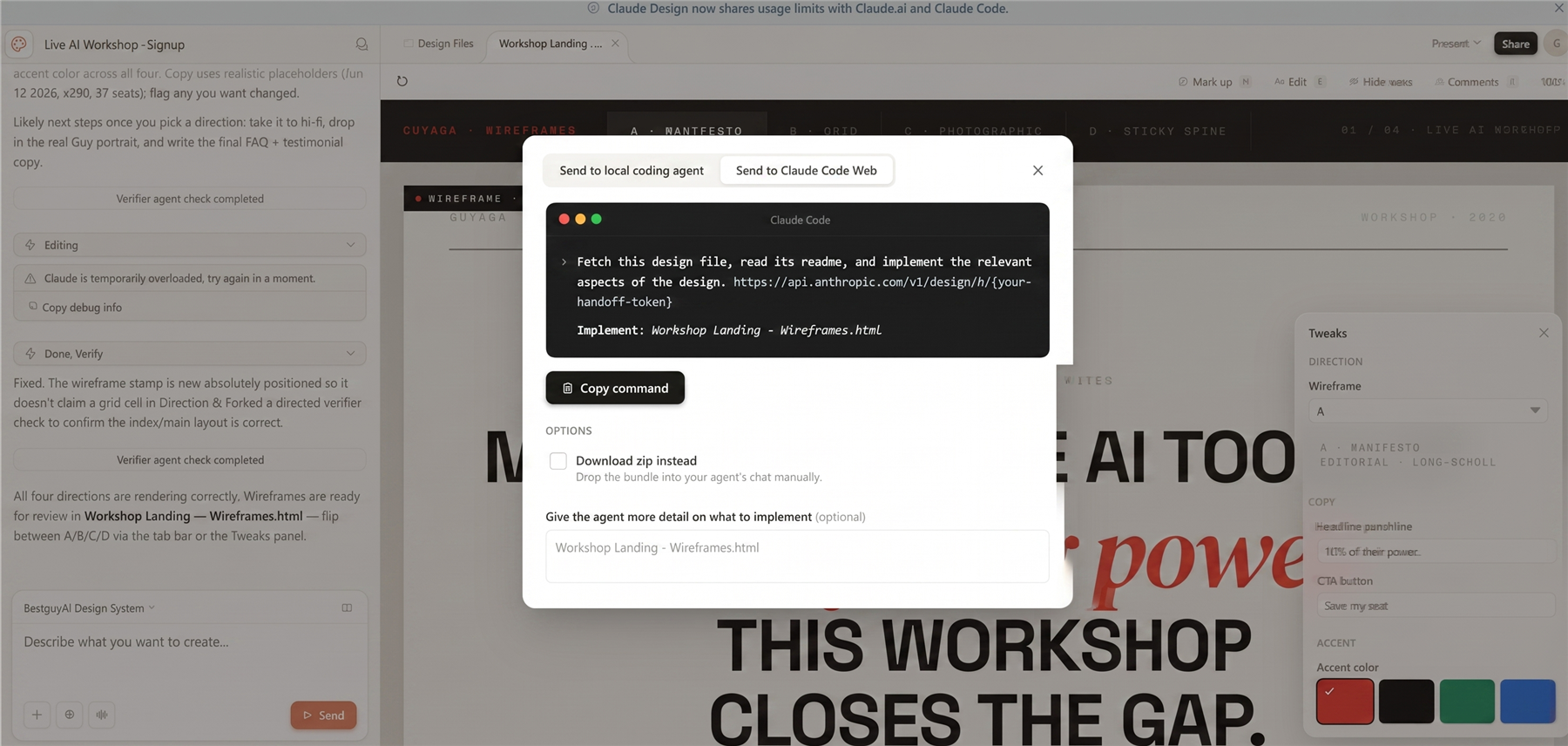
What ships across the boundary is the design system itself plus the wireframe spec — not a screenshot, not a Figma export, not a vibey description. The handoff is the bridge between "design produced by Claude" and "implementation produced by Claude" without a human translator in between. For solo founders, marketing teams without a developer, or any small team using Claude Code as a daily driver, this is the workflow that closes the loop.
Where It Breaks
Visualization logic. When the task is "build a dashboard that communicates this insight," the first output skews toward "visually interesting" rather than "informative." It needs you to specifically direct what to aggregate, what to mask, and what hierarchy to put on a conversion-sensitive page. Victor Dibia called this out in his review and it matches my experience exactly.
Data integrity in prototypes. If your prototype references data with mismatched grain (city-level analytics paired with country-level purchase data, for example), Claude Design will silently produce something that looks fine and is structurally wrong. You're the editor.
UX tradeoffs. It will not tell you when to aggregate vs. show raw numbers, what to hide for privacy, or where to place CTAs on a conversion-sensitive surface. Those are still your calls.
Original aesthetic invention. It produces beautiful, generic-good design. If your brand needs a unique visual identity, you have to bring it. Claude Design will execute against the identity faithfully — it will not invent one.
Claude Design vs. the Field
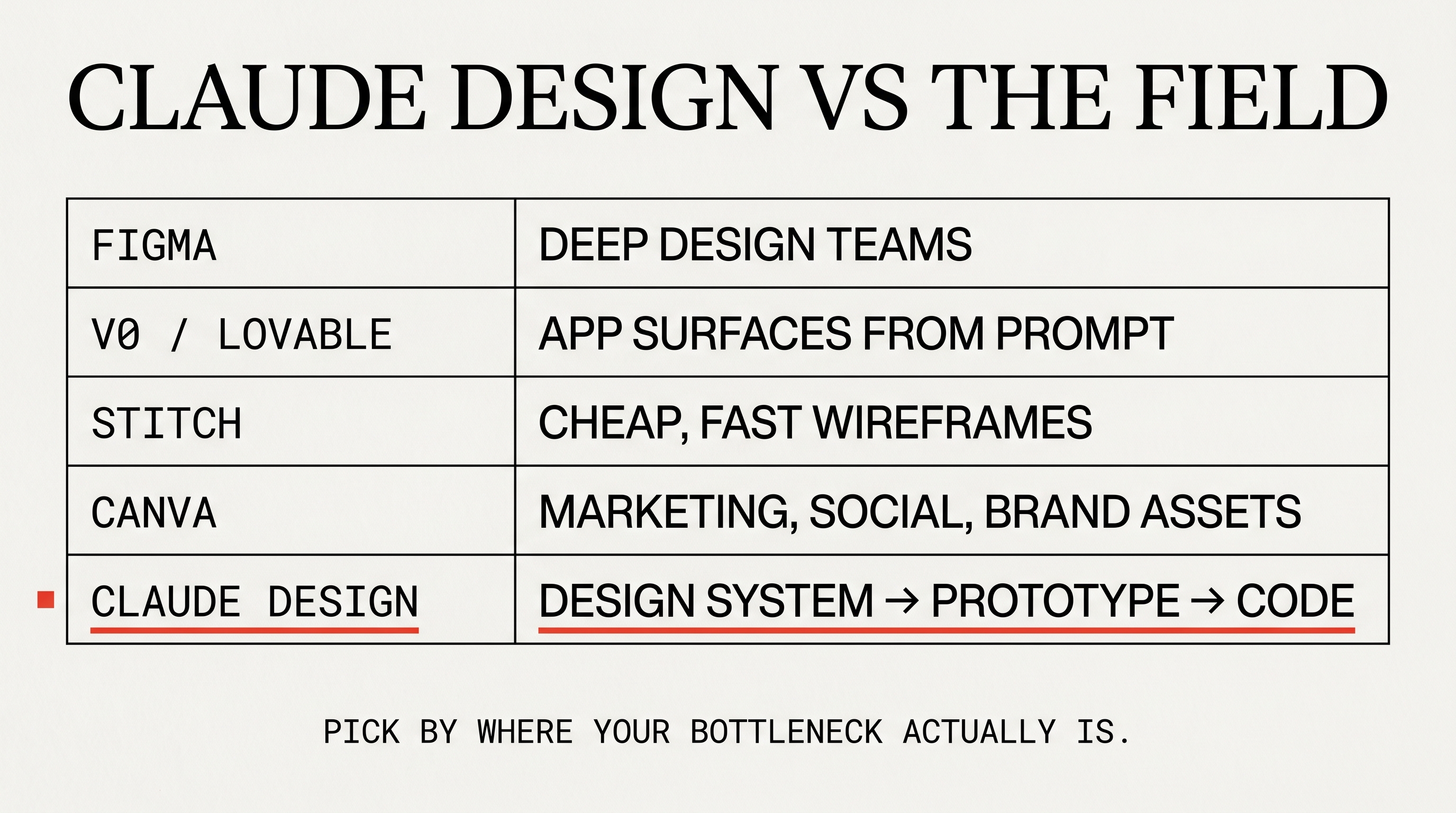
| Tool | Sweet spot | When you wouldn't pick it |
|---|---|---|
| Figma | Established design teams, mature component libraries, deep handoff workflows | You don't have a team or a system yet |
| v0 / Lovable | Devs spinning up app surfaces from prompt to working React | You want to think in terms of design tokens before code |
| Google Stitch | Cheap, fast wireframes — great for the pre-system phase | You want UX intelligence, not just generation |
| Canva | Marketing collateral, social, brand-kit-locked layouts | You're designing a product, not an asset |
| Claude Design | You have a design system (or are ready to build one) and want a brief → prototype → code pipeline with a single brand source of truth | You're a designer at a team with deep Figma investment and no urgent need to ship to code |
When to Reach for It
Use it when:
- You're a founder or PM with a brand kit and a feature idea, and your bottleneck is "I can't draw it well enough to brief a developer."
- You're an engineer who wants to ship UI at speed without faking design competence — Claude Design hands you something a designer wouldn't be embarrassed to see, then hands it off to Claude Code in a format that respects the system.
- You're a designer with a mature system who wants to compress the wireframe → hi-fi → handoff loop. The Tweaks panel is essentially your variant controls at AI speed.
- You're building a real product, not a marketing page. The UX-question intake earns its keep on product surfaces with logic and states. On a marketing landing page, the intelligence is wasted.
Avoid it when:
- You don't have a design system and aren't willing to build one. The whole tool assumes the foundation is there.
- You're producing one-off marketing assets. Canva is better and cheaper.
- You need fine-grained collaboration with a design team. The collaboration story is still early.
- You're producing a data-dense surface where the visualization is the design. You'll fight the tool on every decision.
Key Takeaways
- Claude Design is design-system-first. The foundation is the unlock. Treat the system setup as the most important step in the whole pipeline.
- It is, structurally, a visual layer on top of Claude Code. That's a feature, not a limitation — it means the handoff is genuinely tight.
- The UX intake questions are the differentiator. They force you to make product decisions before pixels exist. That's what separates it from Stitch, v0, Lovable, Replit.
- Watch your token budget. Generate your system cheaply elsewhere if you can, switch models for routine tweaks, and don't assume Claude Design's limits are linked to your main account.
- You still drive the UX. It produces beautiful default-good output. The hard product decisions are yours.
- Best workflow for me: Pre-bake the system → upload → wireframes with three variants → pick one → hi-fi with the system attached → Claude Code handoff via the zip + command. End to end, a few hours instead of a week.
If you have a real brand and a real idea and you've been wishing for the gap between them to close, this is the closest I've seen.
This guide draws on Anthropic's launch announcement, hands-on practitioner reviews (Victor Dibia, Elizabeth Alli), and concrete walkthroughs of the tool's UI patterns including the design-system onboarding, the UX intake flow, the Tweaks panel, and the Claude Code handoff modal.
AI · Claude Code · Tools · Product · UX