
All writing · 9 Jun 2026 · 10 min read
From Passive Chat to Always-On Agent: A 3-Tier Claude Code Automation Stack
Most people use Claude Code passively — open it, prompt, close it. Here's the three-tier automation stack that turns it into a reliable teammate handling PR reviews, issue triage, and background tasks while you sleep.
Most people use Claude Code passively. You open it when you're stuck, type a prompt, get an answer, and close the tab. I did the same thing for months — paying for a plan and barely touching what it could actually do.
The shift happened when I stopped treating it like a chat box and started treating it like infrastructure. Now Claude Code runs most of the day without me sitting there: it scans repos, leaves first-pass comments on pull requests, triages new issues, and summarizes overnight activity before I've finished my coffee. It's less "AI assistant" and more "a dependable junior teammate who never needs hand-holding."
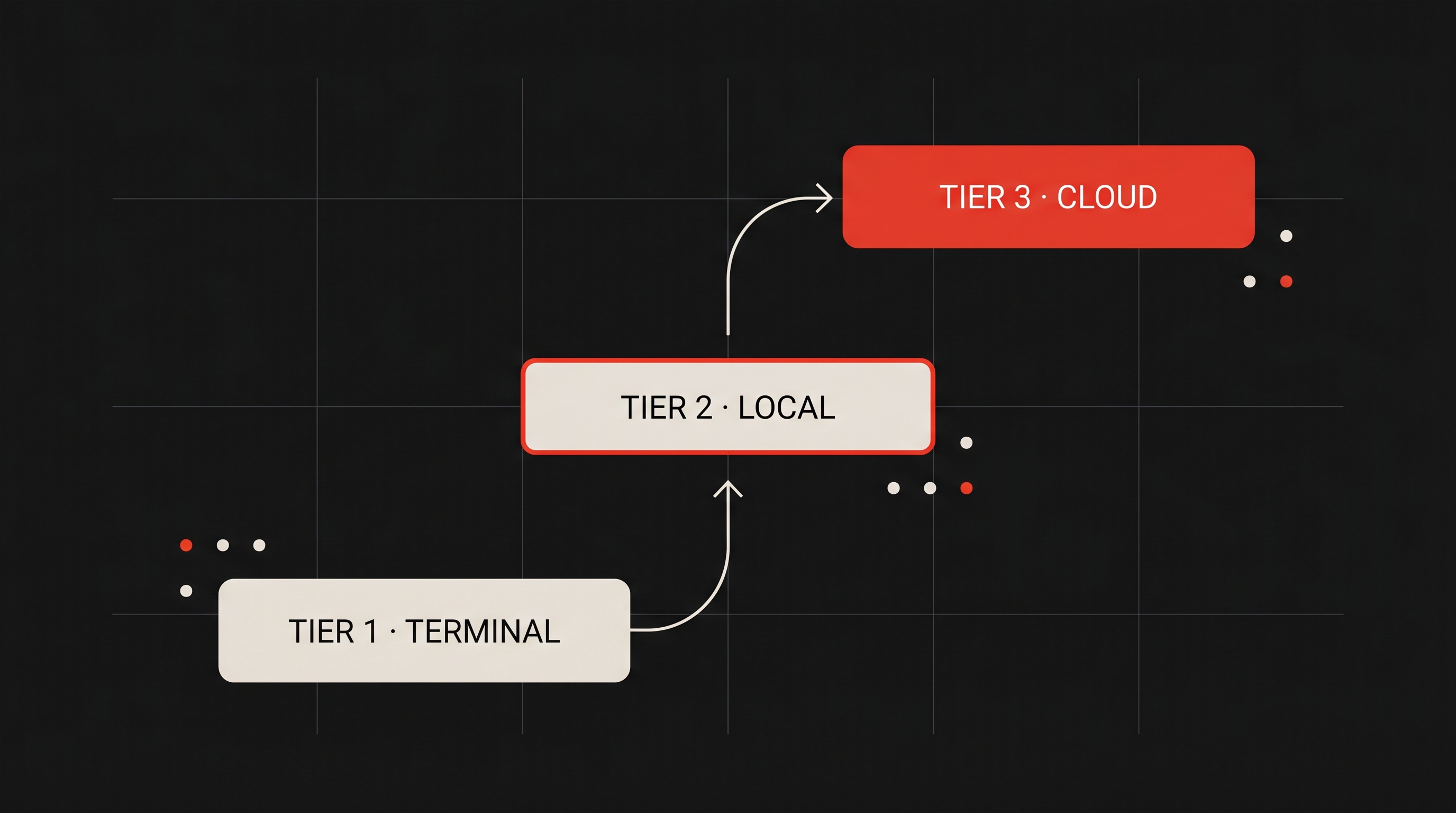
This post walks through the exact stack I use, organized as three tiers. The progression is the whole point: prototype fast in the terminal, stabilize locally, then move to the cloud for true independence. Skip a tier and you either over-engineer something that wasn't worth it, or you ship an autonomous agent you never actually validated.
Why Bother Building Automation Layers At All
Be honest about where your time goes. For me, a huge slice was repetitive context-switching: scanning new issues, reviewing routine PRs, nudging docs back into sync, checking whether a deploy went green. None of that needs creativity. It needs consistency — the one thing humans are worst at and machines are best at.
Once I moved those chores onto the three tiers below, I got those hours back for the work that actually requires a brain: architecture, product decisions, the genuinely hard problems. That's the trade. You're not automating to look clever — you're automating to reclaim attention.
The mental model: treat each automation like a service, not a one-off prompt. Services have monitoring, permissions, and budgets. The moment you think that way, the rest of this post falls into place.
Tier 1: /loop — Where Every Idea Starts
I prototype almost every automation idea inside a live Claude Code session using /loop. It's the fastest way to find out whether something is worth promoting before I invest any real effort in it.
The simplest form is an interval plus a plain-English instruction:
/loop 15m Check for new GitHub issues in my main repo and summarize the high-priority onesNatural-language scheduling works too:
Every weekday at 7am, summarize overnight commits.And when you want precision, standard cron expressions are supported:
*/15 * * * *Cron here understands steps, ranges, and lists — but not the extended tokens like L for "last day of the month." Keep it to the basics and you'll be fine. These are the patterns I reach for most:
# Cron patterns that actually earn their keep

# every 5 minutes, business hours only
*/5 9-17 * * 1-5

# every weekday at 7am
0 7 * * 1-5

# first of the month at 9am
0 9 1 * *

# every 15 minutes
*/15 * * * *

# nightly at 2:30am
30 2 * * *

# every Friday at 4pm
0 16 * * 5

# every 6 hours, on the hour
0 */6 * * *
Pair /loop with /goal for anything that should run "until done"
A bare loop runs on a schedule, but it'll happily stop at a "good enough" point. For test-debugging, queue processing, or an iterative refactor, that's not what you want. Wrap it with /goal and give it an explicit stop condition — the loop keeps going until that condition is genuinely met, not until it feels satisfied.
What daily use taught me about Tier 1
| Behavior | What it means in practice |
|---|---|
| Tasks expire after 7 days | Recreate the ones that matter, or promote them to a higher tier before they vanish |
| Max 50 tasks per session | More than enough for experimentation; if you're hitting it, you've outgrown Tier 1 |
| No catch-up for missed intervals | Fine for polling jobs — you just get the next tick |
| Everything dies when the session closes | A feature, not a bug — perfect for throwaway experiments |
You can list or cancel loops conversationally — just ask. And in any shared or CI environment, set CLAUDE_CODE_DISABLE_CRON=1 so a stray loop doesn't surprise a teammate.
Pro tip: Tier 1 is a proving ground, not a home. If a loop has survived a week and you keep recreating it, that's your signal to promote it. Don't let valuable automations live on borrowed time.
Tier 2: Desktop Scheduled Tasks — The Local Backbone
Once a loop proves its worth, it graduates to the Claude Desktop scheduler. The path is:
Schedule → New task → New local task
You give it a name, a prompt, a frequency, a permission set, and a working folder. The detail that matters most: every run starts with fresh context. No state accumulates between runs, which quietly kills an entire category of bugs that creep into long-lived sessions.
This tier survives reboots and closed terminals — as long as the machine is awake. Turn on "Keep computer awake" for reliability, and know that it'll do exactly one catch-up run for the most recent missed task within the last 7 days.
I use Tier 2 for anything that benefits from real local file access:
- Daily dependency scans
- A morning briefing on my local repos
- Running the test suite against my actual dev environment
The fresh-context-per-run property has saved me from subtle state bugs more than once. If you're on Linux like I often am, you can mix this with system cron and get the same outcome from the CLI.
Pro tip: The single biggest reliability win at this tier is "Keep computer awake." A scheduled task that never fires because the laptop slept isn't a bug in Claude — it's a bug in your setup. Fix the environment before you blame the agent.
Tier 3: Cloud Routines — The Always-On Workforce
This is where it stops being a convenience and starts being genuinely powerful. Cloud Routines (released as a research preview in April 2026) run on Anthropic's infrastructure — independent of whether your laptop is open, asleep, or stuffed in a bag at 30,000 feet.
You create them three ways:
- At claude.ai/code/routines
- In the Desktop app by choosing Remote
- Via
/schedulein the CLI for scheduled ones
Each routine bundles a clear prompt, the repos it needs (fresh clone per run), connectors (Slack, Linear, GitHub, and friends), environment settings, and triggers. The triggers are where it gets interesting.
Scheduled routines
The bread and butter. I run a morning briefing that pulls metrics and new issues and posts a digest to Slack. Another scans my assigned PRs at 9am and leaves an initial pass of comments. A weekly documentation-drift check flags stale files and opens draft PRs. All of it fires reliably in my local timezone, whether or not I'm online.
API-triggered routines
Each routine gets a unique endpoint protected by a bearer token. I call these from CI pipelines and monitoring tools. The pattern I like best: a failed build automatically triggers an investigation and opens a draft fix PR — so by the time I look, there's already a starting point waiting.
GitHub-triggered routines
These hook directly into PRs, issues, and workflow runs, and you can filter by label, branch, or author. A few that keep my backlog clean:
- New PR → automated first-pass review
- New issue → triaged and labeled
- CI failure → root-cause analysis
By default, routines push to claude/ branches — a sane guardrail I keep enabled so nothing autonomous ever lands directly on main.
The Part Most People Skip: Guardrails
Here's the uncomfortable truth about unattended agents: an automation that runs while you sleep is only as safe as the permissions you gave it. This is the section that separates "neat demo" from "I trust this in production."
Permissions and the blast-radius question
I never use blanket approvals. Instead I lean on three things: allow/deny lists in settings.json, .claudeignore files to keep secrets out of reach, and audit logs I actually review. Here's the shape of a config I'm comfortable leaving unattended:
{
  "permissions": {
    "autoApprove": [
      "Read(*)",
      "Grep(*)",
      "Bash(npm test)",
      "Bash(pytest)",
      "Bash(git status)",
      "Bash(git diff*)",
      "Bash(git log*)",
      "WebFetch(domain:docs.python.org)"
    ],
    "deny": [
      "Bash(rm -rf*)",
      "Bash(git push*)",
      "Bash(*--force*)",
      "Bash(curl*)",
      "Edit(.env*)",
      "Edit(secrets/*)"
    ]
  },
  "auditLog": true
}
Auto Mode changed how I think about this. It uses a classifier to auto-approve the roughly 93% of actions that are clearly safe and escalates the rest to a human. I layer it on top of explicit policies, audit logs, and ignore files rather than relying on it alone.
The question I ask before granting any permission is dead simple: if this goes wrong, how expensive is the undo? Cheap, reversible actions get more freedom. Anything that touches main, secrets, or the outside world gets locked down.
Token management, or: how to not light money on fire
Every scheduled run is a full session. Early on I burned through limits by running frequent loops on an expensive model for trivial work. Now I follow three rules:
- Put explicit token budgets in the prompt, with instructions for handling partial progress.
- Default to Sonnet or Haiku for routine work; reserve Opus for genuinely complex analysis.
- Monitor usage and scale up only when volume actually justifies it.
Explicit budgeting is what flipped automation from a cost center into a productivity multiplier. Choosing the right model per job is an architecture decision, exactly like choosing the right cloud instance size — not an afterthought.
Pro tip: Don't reach for Opus by default. Most automation is summarizing, triaging, and labeling — work Haiku and Sonnet handle beautifully at a fraction of the cost. Save the expensive model for the small slice of tasks that genuinely need it.
Compose with Skills and Workflows
I keep reusable Skills in ~/.claude/skills/ so a "PR review" or "morning briefing" recipe stays consistent everywhere it's referenced. For bigger jobs, I use dynamic workflows with parallel subagents, and I let one routine's output trigger the next — opening a PR in one routine can kick off a review in another.
This composable approach scales far better than the tempting "one giant prompt to rule them all." Small, focused routines chained together beat a single sprawling agent every time.
Pitfalls I Hit So You Don't Have To
- Forgetting the 7-day expiry on loops — and losing automations I'd come to rely on.
- Vague prompts that fall apart in an autonomous run because there's no human there to clarify.
- Defaulting to a high-cost model out of habit.
- Skipping the morning audit-log review — the cheapest insurance you have.
- Staying in one tier too long instead of promoting what's earned it.
The Bigger Lessons
Building this stack quietly changed how I think about my own role:
- Explicitness is everything. An autonomous run can't ask a follow-up question, so your success criteria have to be crystal clear up front.
- Treat AI sessions like services. Monitoring, permissions, budgets — the same discipline you'd apply to any production system.
- Composition beats complexity. Small focused routines chained together outperform one elaborate mega-agent.
- Human oversight, well placed. Let Auto Mode handle the routine 93% so your attention goes to the exceptions that actually need it.
- Cost awareness is architecture. Model choice shapes your system as much as any code you write.
Where To Start Tomorrow
Don't try to build the whole stack at once. Pick one low-risk loop:
Every 30 minutes, summarize new issues in my main repo.Run it for a few days. If it proves useful, promote it to a Desktop scheduled task. If it keeps proving useful, graduate it to a Cloud Routine. That single path — terminal → local → cloud — is the entire methodology.
The best part: almost everything here uses capabilities you're probably already paying for. The output follows the configuration, and thoughtful configuration is the whole game.
Key Takeaways
| Tier | Tool | Lives as long as | Best for |
|---|---|---|---|
| 1 | /loop (+ /goal) | The session is open | Rapid prototyping & validation |
| 2 | Desktop Scheduled Tasks | The machine is awake | Personal workflows needing local files |
| 3 | Cloud Routines | Always — runs on Anthropic infra | True unattended, always-on automation |
- Promote, don't pile up. Validate in Tier 1, stabilize in Tier 2, go always-on in Tier 3.
- Permissions before power. Allow/deny lists,
.claudeignore, audit logs, and Auto Mode — every time. - Budget your tokens and your models. Haiku/Sonnet for chores, Opus for the hard 10%.
- Be explicit. Autonomous runs reward crystal-clear success criteria and punish vague prompts.
Claude Code · AI · Tools · Strategy